

Opis
GroWebsite Limit Delivery To Pincodes allows WooCommerce store owners to restrict checkout to specific pincodes (postcodes).
If a customer enters a non-serviceable pincode, the checkout process is automatically blocked to prevent invalid orders.
The plugin also provides a shortcode-based delivery availability checker that customers can use to verify whether delivery is available in their area before placing an order.
This plugin works seamlessly with WooCommerce checkout and supports modern WordPress themes, Elementor, and Gutenberg.
Why Use This Plugin?
GroWebsite Limit Delivery To Pincodes is designed for WooCommerce stores that deliver only to selected serviceable locations.
It helps prevent orders from unsupported areas and improves customer experience by allowing users to check delivery availability before checkout.
Perfect For
- Grocery delivery stores
- Local food delivery websites
- Pharmacy delivery stores
- Hyperlocal ecommerce websites
- Businesses delivering only to selected pincodes
Key Features
- Restrict WooCommerce checkout to selected pincodes
- Automatic checkout validation
- Disable “Place Order” button for non-serviceable areas
- AJAX-based frontend pincode checker
- Shortcode: [pincode_checker]
- Mobile responsive design
- Lightweight and optimized
- Fully translation ready
- Secure nonce-based AJAX handling
Usage
Restrict Checkout
- Go to Admin Pincode Delivery.
- Enter one pincode per line.
- Save settings.
Customers will only be able to place orders if their billing postcode matches one of the allowed pincodes.
Frontend Delivery Checker
Use the shortcode:
[growebsite_ldp_pincode_checker]
You can place this shortcode:
- On product pages
- On homepage
- On landing pages
- Inside Elementor or Gutenberg blocks
Support
For support and documentation please visit:
https://growebsite.in/limit-delivery-pincodes/
License
This plugin is licensed under the GPLv2 or later.
Slike ekrana

Plugin admin panel to configure allowed pincodes 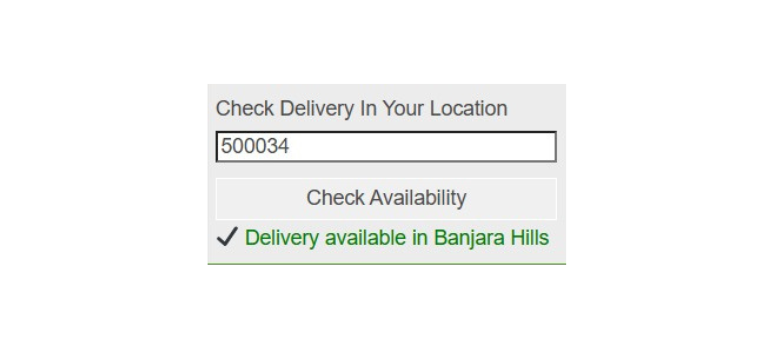
WooCommerce checkout blocking non-serviceable pincode 
Frontend delivery availability checker shortcode 
Instalacija
Method 1: Upload via WordPress Admin
- Go to Plugins Add New Upload Plugin.
- Upload the plugin ZIP file.
- Click Install Now.
- Activate the plugin.
- Go to “Pincode Delivery” in the admin menu to configure allowed pincodes.
Method 2: Manual Installation
- Upload the plugin folder to the
/wp-content/plugins/directory. - Activate the plugin through the ‘Plugins’ menu in WordPress.
- Configure allowed pincodes from the admin menu.
ČPP
-
Does this plugin require WooCommerce?
-
Yes. WooCommerce must be installed and active.
-
Can I enter multiple pincodes?
-
Yes. Enter one pincode per line in the settings area.
-
Does it support AJAX validation?
-
Yes. The pincode is checked instantly without reloading the page.
-
Does it work on mobile devices?
-
Yes. The plugin interface is fully responsive.
-
Can I translate this plugin?
-
Yes. The plugin is fully translation-ready and follows standard WordPress localization practices.
Recenzije
Nema recenzija za ovaj dodatak.
Saradnici i programeri
“GroWebsite Limit Delivery To Pincodes” is open source software. The following people have contributed to this plugin.
Doprinositelji
Prevedi “GroWebsite Limit Delivery To Pincodes” na vaš jezik.
Zainteresirani za razvoj?
Pregledajte kôd, pogledajte SVN spremišteili se pretplatite na dnevnik razvoja od RSS.
Zapis promijena
1.11
- Shortcode changed
1.10
- Updated prefix naming for WordPress.org compliance
- Improved plugin structure and coding standards
- Enhanced compatibility with latest WordPress versions
1.6
- Repository-ready structure
- Proper asset enqueue (CSS and JS files)
- Improved security and sanitization
- Added localization support
- Performance improvements
1.5
- Added responsive CSS
- Improved checkout validation
1.4
- Initial public release