
Opis
A block displaying sidebar widgets on front-end of your website.
What problem does it solve?
You can display a specific sidebar (a widgetized area) in a page content built with block editor.
Got a question or suggestion?
In case of any question or suggestion regarding this plugin, feel free to ask at support section, or at GitHub repository issues.
Slike ekrana

Preview of sidebar displayed on front-end of the website 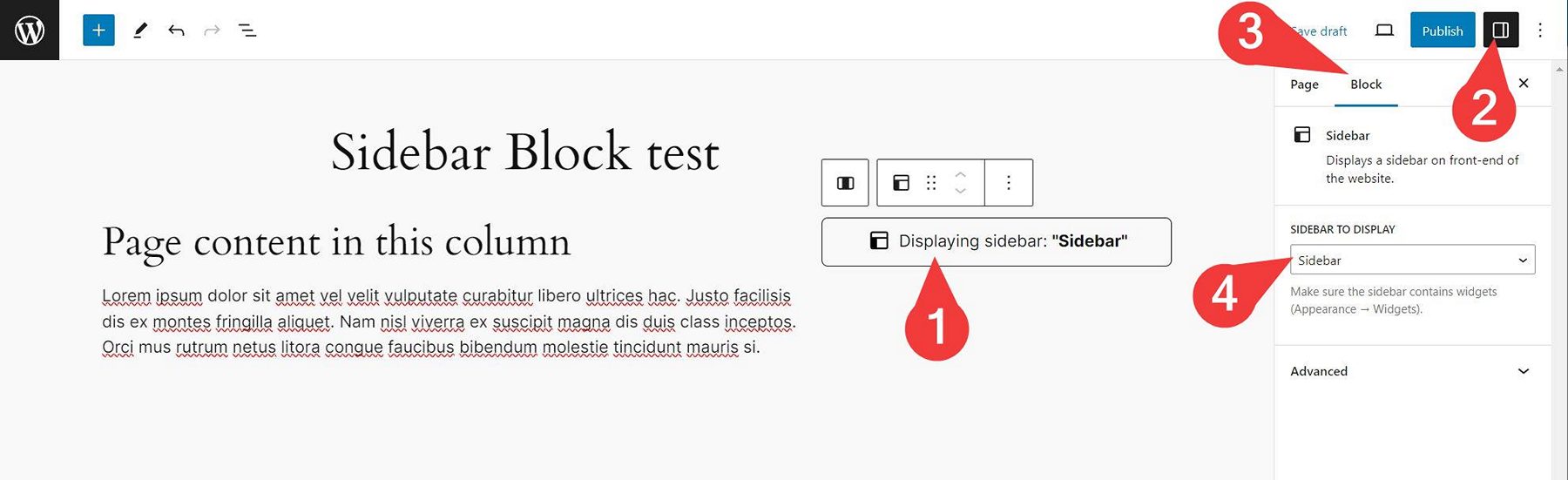
How to display a sidebar within block editor 
How to set up sidebar widgets
Blokovi
Ovaj dodatak omogućava 1 blok.
- Wmd Sidebar
Instalacija
- Unzip the plugin download file and upload
sidebar-blockfolder into the/wp-content/plugins/directory. - Activate the “Sidebar Block” plugin through the “Plugins” menu in WordPress.
- Plugin works immediately after activation by adding new “Sidebar” block into WordPress native block editor. You can use the block in your page/post content then. Simply select a sidebar in block options and the sidebar will be displayed on your website front-end (if it contains widgets).
ČPP
-
How does it work?
-
- Insert “Sidebar“” block into your page/post content (or into Site Editor) where you want to display the sidebar.
- In block options select a sidebar to display.
- Save the post/page/Site Editor.
- Watch the sidebar appear on your website front-end.
Please note that the sidebar has to contain some widgets you can add in Appearance Widgets admin screen.
-
Yes. The plugin creates a new “Sidebar” widget area for you, if your theme does not create such sidebar (with ID of
sidebar) for you. -
Yes. This is possible by using additional sidebar management plugin.
Recenzije
Nema recenzija za ovaj dodatak.
Saradnici i programeri
“Sidebar Block” is open source software. The following people have contributed to this plugin.
Doprinositelji
“Sidebar Block” je prijeveden na 1 dijalekt. Zahvala prevodiocima za njihov doprinos.
Prevedi “Sidebar Block” na vaš jezik.
Zainteresirani za razvoj?
Pregledajte kôd, pogledajte SVN spremišteili se pretplatite na dnevnik razvoja od RSS.
Zapis promijena
Please see the changelog.md file for details.